
# BullMQ vs RabbitMQ vs Kafka: Which Queue Should a Node.js Team Pick?
TL;DR: For BullMQ vs RabbitMQ vs Kafka, pick BullMQ when you're a Node.js shop with Redis already in place and you mostly need background jobs, delays, and retries; pick RabbitMQ when you need flexible routing between services written in different languages; pick Kafka when you need an ordered, replayable event log that multiple independent consumers read at their own pace.
These three keep showing up in the same "which queue" conversations, but they're not really substitutes for each other. They solve different problems and only overlap at the edges. Picking based on a feature checklist — "does it have retries," "does it have priorities" — misses the point, because the underlying data model is what actually constrains what you can build later. This post walks through that model difference first, then gives a comparison table, a working BullMQ example, and a decision framework you can apply directly.
BullMQ vs RabbitMQ vs Kafka: the fundamental model difference
Before comparing features, it helps to be precise about what each tool actually is:
- BullMQ is a Node.js library that implements a job queue on top of Redis. There's no separate broker process to run — Redis is the broker. Jobs live as Redis keys/streams, and BullMQ's Lua scripts handle atomic state transitions (waiting → active → completed/failed).
- RabbitMQ is a standalone message broker that implements AMQP 0-9-1 (plus optional MQTT, STOMP, and AMQP 1.0 plugins). Producers publish to an exchange, which routes messages into one or more queues based on bindings, and consumers pull or get pushed messages from those queues.
- Kafka is a distributed, partitioned, append-only commit log. Producers write records to topic partitions; the broker doesn't "know" about consumers the way RabbitMQ does. Consumers (organized into consumer groups) track their own read position — the offset — and can rewind or replay, because records aren't deleted on read.
That last point is the crux of it. In BullMQ and RabbitMQ, a message's job is done once a worker finishes with it — it's removed (or acked away). In Kafka, a record just sits in the log until its retention window expires, regardless of who has read it. That single difference is why Kafka fits event streaming and audit-style use cases that BullMQ and RabbitMQ aren't built for, and why BullMQ and RabbitMQ fit task-execution use cases that Kafka is comparatively awkward at.
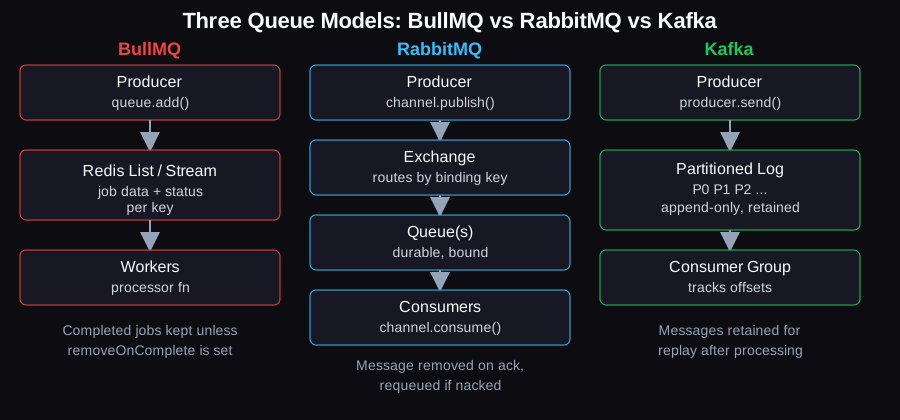
BullMQ jobs disappear from Redis on completion; RabbitMQ messages disappear on ack; Kafka records stay in the log for replay.
BullMQ vs RabbitMQ: Redis job queue or AMQP broker?
BullMQ wins when your workload is "run this task, possibly later, possibly on a schedule, possibly with retries" inside a Node.js codebase that already has Redis. RabbitMQ wins when you need a dedicated broker that routes messages between multiple independent services, possibly written in different languages, with routing logic (fanout, topic, headers) that lives in the broker rather than in application code.
The practical difference shows up in three places:
1. Routing. RabbitMQ's exchange/binding model lets you fan a single publish out to many queues, or route by topic pattern, without the publisher knowing who's listening. BullMQ has named queues and job names, but no broker-side routing layer — routing logic lives in your application.
2. Language reach. RabbitMQ has mature client libraries for pretty much every language, which matters if you have Python, Go, and Node services all talking through the same broker. BullMQ is Node.js-first (a Python client exists, but the ecosystem and docs are built around Node/TypeScript).
3. Operational surface. RabbitMQ is a separate service you deploy, cluster, and monitor. BullMQ's only infrastructure dependency is Redis, which many Node.js teams are already running for caching or sessions — so the incremental ops cost of adding job processing can be close to zero.
BullMQ vs Kafka: background jobs or an event log?
BullMQ and Kafka aren't really competing for the same job. BullMQ is for tasks — "send this email," "resize this image," "run this at 3am" — that a worker executes once and then discards. Kafka is for events — "this order was placed," "this user signed up" — that multiple, independent consumers may want to read now, later, or more than once, in the order they happened.
Kafka guarantees ordering only within a partition, not across a whole topic, which is a common point of confusion — if two events must be processed in order, they need the same partition key. BullMQ, by contrast, guarantees FIFO processing per queue only when concurrency is 1; with concurrency >1 (the normal case), jobs can complete out of order unless you explicitly design around it (e.g., with job groups in BullMQ Pro, or a single-worker queue).
Interestingly, as of Kafka 4.2 (February 2026), Kafka shipped Queues for Kafka (KIP-932) as generally available — a share-group consumption model that behaves more like a traditional queue, with per-record acknowledgment instead of only offset commits. That narrows the gap somewhat, but it doesn't change the core tradeoff: Kafka is still an ordered log with configurable retention, and running it well (brokers, partitions, replication, consumer group rebalancing) is a meaningfully bigger operational commitment than running Redis for BullMQ.
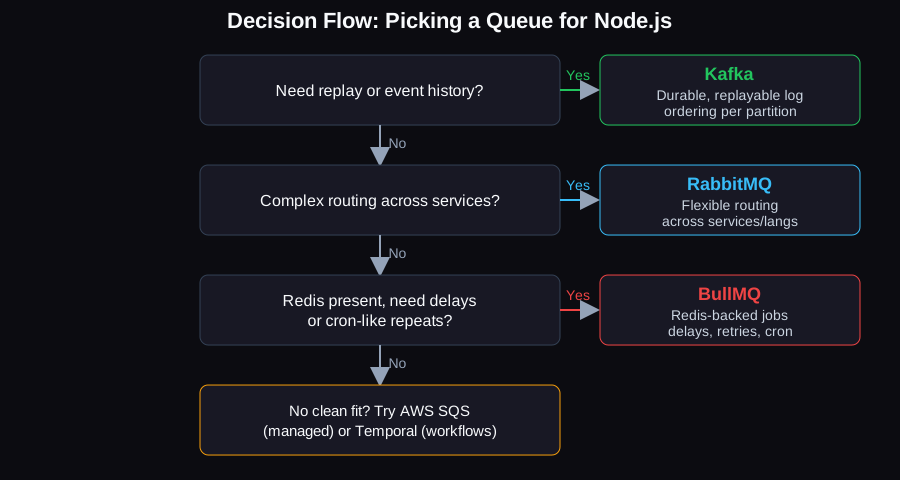
Start from what you actually need — replay, cross-service routing, or Redis-backed background jobs — and the choice mostly falls out on its own.
Comparison table
| BullMQ | RabbitMQ | Kafka | |
|---|---|---|---|
| Model | Redis-backed job queue (library, not a service) | AMQP message broker | Distributed partitioned log |
| Delivery semantics | At-least-once (job may be reprocessed if a worker stalls/crashes) | At-least-once with manual ack; at-most-once if auto-ack | At-least-once by default; exactly-once available within Kafka via transactional producers/idempotent writes |
| Ordering | Per-queue FIFO only at concurrency 1; not guaranteed with parallel workers | Per-queue order preserved for a single consumer | Guaranteed per-partition only, not topic-wide |
| Replay | No — completed jobs are removed (unless you keep them with removeOnComplete: false) | No — acked messages are gone | Yes — records retained per topic retention policy regardless of consumption |
| Retries / delays / repeats | Built in: delay, attempts, backoff, repeatable/cron-like jobs | Requires plugins or dead-letter-exchange + TTL patterns | Not a native concept — you build retry topics yourself |
| Ops burden | Low if Redis already exists; requires maxmemory-policy=noeviction and AOF persistence for durability | Medium — separate broker, clustering, quorum queues for HA | High — multi-broker cluster, partition/replication planning, consumer group tuning |
| When to pick | Node.js app needs background jobs/scheduling and already has Redis | Multi-language services need flexible, broker-side routing | You need an ordered, replayable event history across many consumers |
Background jobs in Node.js: a correct BullMQ example
BullMQ (current major is v6, which added an optional PostgreSQL backend alongside the default Redis one) separates a Queue (used to add jobs) from a Worker (used to process them). Here's a minimal, correct producer/worker pair:
// queue.ts — producer side
import { Queue } from 'bullmq';

const connection = { host: '127.0.0.1', port: 6379 };

export const emailQueue = new Queue('emails', { connection });

async function enqueueWelcomeEmail(userId: string) {
  await emailQueue.add(
    'welcome-email',
    { userId },
    {
      attempts: 3,
      backoff: { type: 'exponential', delay: 5000 },
      removeOnComplete: 1000,
      removeOnFail: 5000,
    },
  );
}
// worker.ts — consumer side
import { Worker, Job } from 'bullmq';
const connection = { host: '127.0.0.1', port: 6379 };
const worker = new Worker(
'emails',
async (job: Job) => {
if (job.name === 'welcome-email') {
await sendWelcomeEmail(job.data.userId);
}
},
{ connection, concurrency: 10 },
);
worker.on('completed', (job) => {
console.log(`Job ${job.id} completed`);
});
worker.on('failed', (job, err) => {
console.error(`Job ${job?.id} failed: ${err.message}`);
});Two production requirements that are easy to miss: BullMQ's production guide requires Redis to be configured with maxmemory-policy=noeviction, because BullMQ needs Redis to never silently evict job keys — that's the "only setting that guarantees the correct behavior of the queues." It also recommends enabling AOF persistence so jobs survive a Redis restart. Skipping either isn't a style choice; it's the difference between a queue that behaves predictably under memory pressure and one that quietly loses jobs.
Where do AWS SQS and Temporal fit?
If you're already on AWS and don't want to run Redis, RabbitMQ, or Kafka yourself, SQS is a reasonable default for simple decoupled messaging — standard queues give at-least-once delivery with best-effort ordering, FIFO queues give strict ordering within a message group and deduplicate repeated sends inside a 5-minute window (AWS calls this exactly-once processing, but your consumer still needs to be idempotent if it fails after processing and before deleting the message), and you pay per request with no cluster to operate. It's lower-level than BullMQ, though — no built-in job scheduling UI, no priorities, and no dependency graphs between jobs (BullMQ Flows) without building that yourself.
Temporal solves a different problem again: it's a workflow orchestration platform that keeps durable state across steps, so a multi-step process (charge card → provision resource → send email → wait for webhook) survives worker crashes and resumes exactly where it left off, with built-in retries, timers, and signals. If what you're calling a "background job" has actually grown into a stateful, multi-step business process with compensation logic, that's a sign you've outgrown a plain queue and Temporal (or a similar durable-execution engine) is worth evaluating — regardless of whether the queue underneath is BullMQ, SQS, or something else. Teams that would rather not own that additional operational surface themselves sometimes bring in outside cloud and DevOps support to stand it up and run it.
Decision framework
Ask these in order:
1. Do multiple independent consumers need to replay history, or read the same stream at different times? → Kafka.
2. Do you need broker-side routing across services in different languages, with the broker owning fanout/topic logic? → RabbitMQ.
3. Is this a Node.js app with Redis already available, needing background jobs, delays, or cron-like repeats? → BullMQ.
4. None of the above, and you'd rather not operate any of the three? → AWS SQS (simple queueing) or Temporal (if the "job" is really a multi-step workflow).
FAQ
What's the difference between a message queue and event streaming?
A message queue (BullMQ, RabbitMQ) typically removes a message once it's been successfully processed — the queue is a to-do list, not a record. Event streaming (Kafka) retains records for a configured retention period regardless of consumption, so it functions as a durable, replayable log that multiple consumers can read independently.
Is BullMQ good enough for production background jobs in Node.js?
Yes, for typical background-job workloads — it has retries, exponential backoff, delayed and repeatable jobs, and job dependencies (Flows) built in. The requirements are that Redis be configured with maxmemory-policy=noeviction and persistence (AOF) enabled, per BullMQ's own going-to-production guide.
Should I use BullMQ vs SQS if I'm already on AWS?
Use SQS if you want a fully managed queue with no server to run and your needs are simple (fire-and-forget, decoupling two services). Use BullMQ if you need job priorities, delays, repeatable/cron-like jobs, parent-child job dependencies, or a Node.js-native API, and you're fine operating Redis.
Does Kafka guarantee message order?
Only within a single partition. Records with the same partition key are always delivered to a consumer in the order they were written, but there's no ordering guarantee across an entire topic's partitions. If strict global ordering matters, you need a single partition, which limits parallelism.
Sources
- BullMQ documentation
- BullMQ: Going to production
- BullMQ v6: PostgreSQL support
- BullMQ changelog
- RabbitMQ release information
- RabbitMQ concepts: exchanges and queues
- Apache Kafka blog: release announcements
- KIP-932: Queues for Kafka
- KIP-833: Mark KRaft as Production Ready
- Amazon SQS documentation
- Temporal documentation