
# Horizontal vs Vertical Scaling: A Simple Guide (With Diagrams)
TL;DR: When your app gets too slow or too popular for its current server, you have exactly two options — make that one server bigger (vertical scaling), or add more servers to share the load (horizontal scaling). Most real systems eventually use both, but understanding when each one actually helps is the difference between a smooth growth story and a 3am outage.
The Problem: Your App Is Getting Popular, and That's Bad News Too
Picture a small restaurant with one chef. Business is slow, so one chef handling every order — chopping, cooking, plating — works fine. Then a food blogger reviews the place, and suddenly there's a line out the door.
The owner has two options: get the chef a faster stove, sharper knives, and a bigger prep counter — so the same one chef can work through orders faster. Or hire two more chefs and give each one their own station, splitting the orders between them.
That's the entire concept behind scaling a server. The "restaurant" is your application, the "chef" is your server, and the "orders" are user requests. When traffic grows past what your current setup can handle, you either upgrade the machine you have, or you add more machines.
Vertical Scaling: Make the One Server Bigger
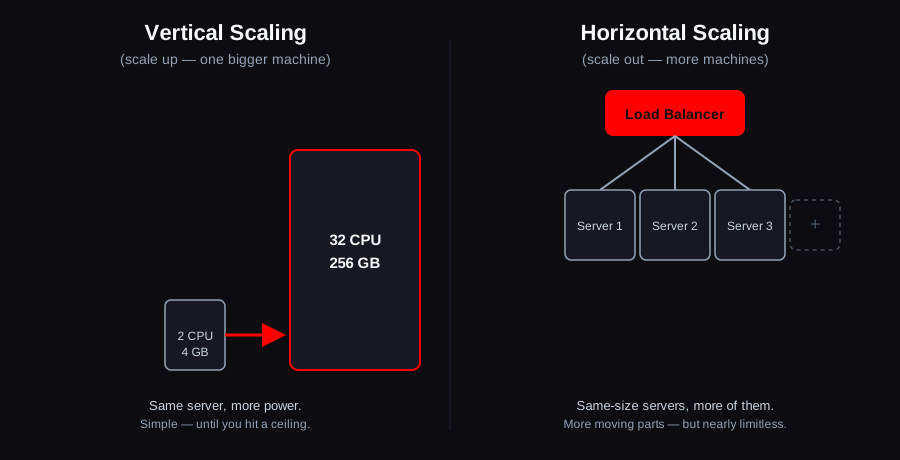
Vertical scaling — also called "scaling up" — means increasing the resources (CPU, RAM, storage, network bandwidth) of a single server, instead of adding more servers. Think of it as swapping a 4-core, 8GB laptop for a 32-core, 256GB workstation, but for a server running in the cloud.
Why teams reach for it first:
- It's simple. You don't need to change how your application is written — a bigger machine just runs the exact same code faster.
- No coordination problems. With one server, there's no question of which server has the latest data, no risk of two servers disagreeing with each other.
- It's the obvious first move. If your database server is straining under load, upgrading its RAM and CPU is usually a five-minute change in a cloud console, not an architecture project.
Where it runs out of road:
- There's a physical ceiling. Even the largest cloud instances top out — you eventually can't buy a bigger machine, no matter your budget.
- It usually means downtime. Resizing a running server typically requires a restart, so there's a maintenance window, however brief.
- It's a single point of failure. One giant server means one thing that, if it goes down, takes your entire app with it.
A genuinely useful illustration comes from Stack Overflow's own detailed 2016 architecture writeup: its web tier ran a horizontally-scaled fleet of around 9 servers behind a load balancer, but its database tier — the harder part of any system to split apart — ran on just two SQL Server clusters, each an extremely powerful single primary machine (hundreds of gigabytes of RAM, dozens of CPU cores) carrying almost all the load, with replicas kept mainly for failover rather than to share traffic. At the time, that setup was serving roughly 209 million requests a day (Nick Craver). It's a clean real-world example of the split covered above: scale the web tier out horizontally, and scale the harder-to-split database tier up vertically, for as long as that keeps working.
Horizontal Scaling: Add More Servers
Horizontal scaling — "scaling out" — means adding more servers of roughly the same size, and spreading the workload across all of them instead of piling it onto one.
This is where the second chef comes in. Instead of one super-chef with an amazing kitchen, you now have three ordinary chefs, each handling a share of the orders. To make that work, you need someone directing customers to whichever chef is free — that's the job of a load balancer, a piece of infrastructure that sits in front of your servers and routes each incoming request to one of them.
Why teams eventually need it:
- There's no real ceiling. Need more capacity? Add another server. Cloud providers can spin up new machines in minutes, and some setups do this automatically as traffic rises and falls (called auto-scaling).
- It's more resilient. If one server crashes, the load balancer just stops sending it traffic and the others keep serving users — nobody notices.
- It matches how the cloud is priced. Ten small, moderately-priced servers are often cheaper and more flexible than one enormous one, and you can scale back down when traffic drops.
The catch — and it's a real one:
Horizontal scaling only works cleanly if your application is stateless, meaning any server can handle any request without needing to remember something only it knows. If your app stores a user's shopping cart in that one server's memory, and the load balancer sends their next request to a different server, their cart just vanished.
The fix is to move anything that needs to be "remembered" out of the individual servers and into something all of them can share — a database, or a fast shared cache like Redis (which is exactly what our guide to Redis covers). Once state lives outside the servers themselves, you can add or remove servers freely without anything breaking.
Vertical vs Horizontal, Side by Side
| Vertical Scaling (Scale Up) | Horizontal Scaling (Scale Out) | |
|---|---|---|
| What changes | One server gets bigger | More servers are added |
| Complexity to set up | Low — no code changes needed | Higher — needs a load balancer, and often a stateless app |
| Ceiling | Hard limit (biggest machine available) | Effectively unlimited |
| Failure risk | Single point of failure | One server failing doesn't take the app down |
| Downtime to scale | Usually a restart | None — new servers join without interrupting traffic |
| Cost pattern | Jumps in big steps (next instance size up) | Scales in small, flexible increments |
| Good first move for | A single database, a small app, an early-stage product | A growing web app, anything with unpredictable traffic spikes |
How Real Teams Actually Decide
In practice, this isn't an either/or choice — it's a sequence:
1. Start vertical. Early on, a bigger single server almost always solves the problem faster and cheaper than building out load-balanced infrastructure you don't need yet.
2. Scale vertically until it hurts. Keep upgrading the box as long as it's simple and the cost still makes sense.
3. Move to horizontal when you hit a wall — whether that's a hardware ceiling, a reliability requirement (you genuinely can't afford downtime), or a cost curve that stops making sense.
4. Mix both, permanently. Most mature systems run a horizontally-scaled fleet of application servers (for resilience and elasticity) sitting in front of a vertically-scaled — or carefully sharded — database, because databases are the hardest part of a system to scale out.
A simple illustration of how the two mix in practice: a team running two small web servers behind a load balancer might add two more, larger instances during a seasonal traffic spike, then scale back down afterward — horizontal scaling for elasticity — while the database behind them stays a single, well-resourced (vertically-scaled) machine, because splitting a database across multiple machines is a much bigger architectural undertaking than splitting stateless web servers.
FAQ
Is horizontal scaling always better than vertical scaling?
No. Horizontal scaling solves problems vertical scaling can't (a hard capacity ceiling, zero-downtime scaling, resilience to a single server failing), but it adds real complexity — load balancing, statelessness, and often a shared cache or database layer. For a small or early-stage application, vertical scaling is frequently the right call simply because it's dramatically simpler.
Why is scaling a database harder than scaling a web server?
Web servers are easy to duplicate because, once stateless, any copy can answer any request. A database is the state — duplicating it means keeping multiple copies of the same data in sync, which introduces real complexity (replication lag, conflicting writes). That's why databases are often scaled vertically for much longer than the application servers in front of them, or split up carefully (sharding) rather than just cloned.
What's auto-scaling, and is it the same as horizontal scaling?
Auto-scaling is a feature, not a scaling type — it's the automation that adds or removes horizontally-scaled servers based on real-time demand (CPU usage, request count, a schedule), so you're not manually clicking "add server" during a traffic spike at 2am.
Can you run out of horizontal scaling too?
In practice, rarely — but at very large scale, other bottlenecks show up first (database capacity, network limits, cost). Horizontal scaling removes the "one machine's hardware ceiling" problem, but it doesn't remove every other constraint in the system.
Scaling decisions like these — when to resize, when to add a load balancer, when it's time to introduce a caching layer — are exactly the kind of infrastructure work we help teams plan and implement as part of our cloud & DevOps services, rather than something to figure out for the first time during an outage.