
Pizza Xpress: Online Ordering with Automated Multi-Printer Kitchen Sync
Restaurant Technology & Food DeliveryPizza Xpress needed to take orders online without losing the coordination a phone-in order gets for free. We built a customer app, a driver app, a restaurant panel, and an automated print fan-out that puts every order in front of the kitchen, the front desk, the driver, and prep — at the same moment, with nobody relaying it by hand.
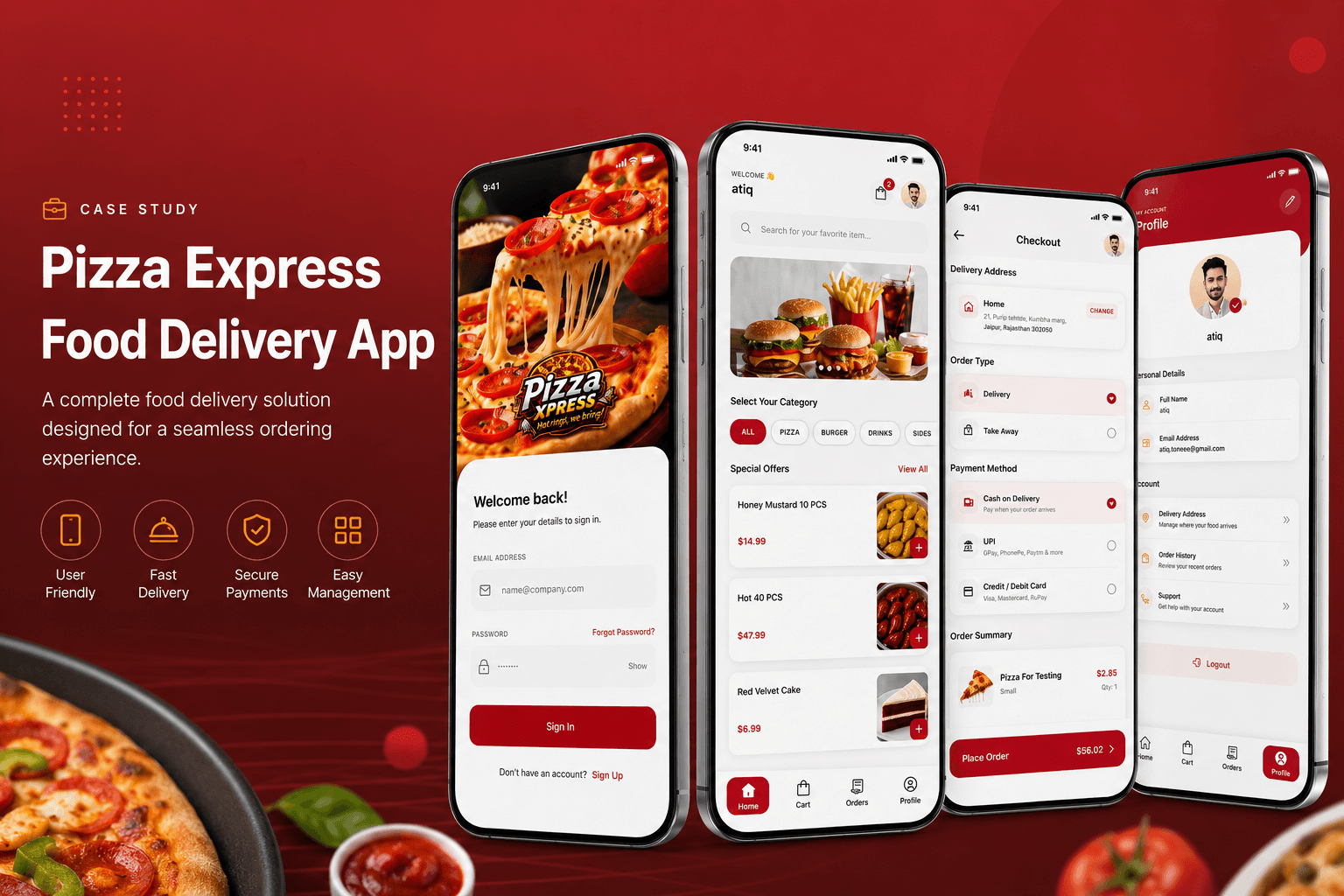
Pizza Xpress needed to move beyond phone-in and walk-in orders to a full digital ordering experience, without losing coordination between the people who actually fulfil each order. An order placed online has to reach the kitchen, the front desk, the driver, and prep staff at the same moment — relaying it by hand between stations during a dinner rush is where orders get delayed, missed, or duplicated.
Core Pain Points Addressed:
- ❌ No digital ordering channel — customers could only order by calling in or walking in, no browsing, no online payment.
- ❌ Manual hand-off between stations — getting an order from the front desk to the kitchen, prep, and the driver meant relaying it by hand.
- ❌ Rush-hour breakdowns — the busier the shift, the more likely a verbal or paper handoff got delayed, missed, or duplicated.
- ❌ No live order status — staff had no shared view of what stage each order was at, or who was covering it.
Pizza Xpress
Restaurant & Food Delivery
2 Apps (Android) & Restaurant Panel
Mobile Apps, Restaurant Panel & Kitchen Print Integration
Four Stations, One Order
Wise Hustlers built a feature-rich food ordering platform for Pizza Xpress, delivered as separate customer and driver React Native apps alongside a React.js restaurant management panel, backed by a Node.js API on MongoDB. Customers browse the menu, customize meals, and pay securely online, placing orders effortlessly through the customer app.
The restaurant management panel gives staff complete control over menu management, order tracking, and order status updates. And because a placed order is worthless until it reaches everyone who has to act on it, the system includes automated multi-printer integration: incoming orders print simultaneously across four thermal printers — in the kitchen, at the front desk, at the driver station, and at an additional preparation area — so every station has the order the moment it's placed, without anyone relaying it by hand.
Four Surfaces, One Order Stream
Customer App
Browse the menu, customize meals, and pay securely online. Placing an order is a self-serve flow from menu to checkout, with no phone call required.
Driver App
A dedicated app for delivery drivers, separate from the customer experience, so drivers see only what they need to run a delivery.
Restaurant Management Panel
A React.js panel that gives staff complete control over menu management, order tracking, and order status updates — the operational home base for the restaurant.
Multi-Printer Sync Engine
Incoming orders print simultaneously across four thermal printers — kitchen, front desk, driver station, and prep area — the moment an order is placed.
The Life of an Order
From checkout to four printers firing at once — no station waits on another to find out an order exists.
Customer places the order
Menu browsing, meal customization, and secure online payment, all inside the customer app.
Order hits the restaurant panel
The order lands in the restaurant management panel, where staff can see and track it alongside every other open order.
Four printers fire simultaneously
The order prints at once across the kitchen, the front desk, the driver station, and the prep area — no single person relays it between stations.
Kitchen and prep work in parallel
Kitchen and prep staff both have the order in hand from the same moment, instead of one waiting on a handwritten copy from the other.
Front desk and driver stay aligned
The front desk and driver station printers mean the person handing off the order and the person delivering it are working from the same ticket.
Status updates flow back through the panel
Staff update order status in the restaurant panel as the order moves through prep and out the door.
What Made This Non-Trivial
01. Fan-out to four physical printers
A single order has to reach four separate thermal printer stations at effectively the same instant. That means the print job isn't a single hand-off, it's a broadcast the backend owns — the kitchen, front desk, driver station, and prep area all print from the same order event rather than from a copy passed along by staff.
02. Two apps, one order source of truth
Customer and driver run as separate React Native apps so each surface only shows what its user needs, but both read from — and the restaurant panel writes to — the same order and status data, so a status change made by staff is what the driver app reflects.
03. Menu changes without a redeploy
The restaurant management panel gives staff direct control over menu management, so pricing and availability changes are an operational action for restaurant staff, not an engineering ticket.
04. Payment inside the ordering flow
Checkout and payment happen inside the same customer app flow as menu browsing and customization, so placing an order and paying for it is one continuous action rather than a handoff to a separate payment step.
Technology Stack
Two mobile apps, a management panel, and a print fan-out backend, delivered on a stack chosen so one team could own every surface.
React Native
Separate customer and driver apps, each built for its own user: menu browsing and checkout on one side, delivery handling on the other.
Node.js
Powers the order pipeline, including the multi-printer integration that fires an incoming order to all four thermal printer stations at once.
React.js
The staff-facing panel for menu management, order tracking, and order status updates — the operational control room for the restaurant.
MongoDB
Stores the menu, orders, and order status that the customer app, driver app, and restaurant panel all read from and write to.
What Shipped
A complete online ordering platform, live and publicly downloadable on Google Play.
Customer and driver applications are published on Google Play as Pizza Xpress and Pizza Xpress Driver.
Let's Pressure-Test It
Book a free call and tell us what you're building. Worst case, you leave with honest feedback and a clearer plan. Best case, you leave with a team that ships.