
Quixtrix: Online Examination Platform for Students, Teachers & Admins
EdTech & Online AssessmentTimed exams don't tolerate a slow page load or a lost connection. So instead of bolting assessment onto a generic LMS, we built Quixtrix as three purpose-built apps — one for students taking the exam, one for teachers running it, and one for admins overseeing the whole platform.
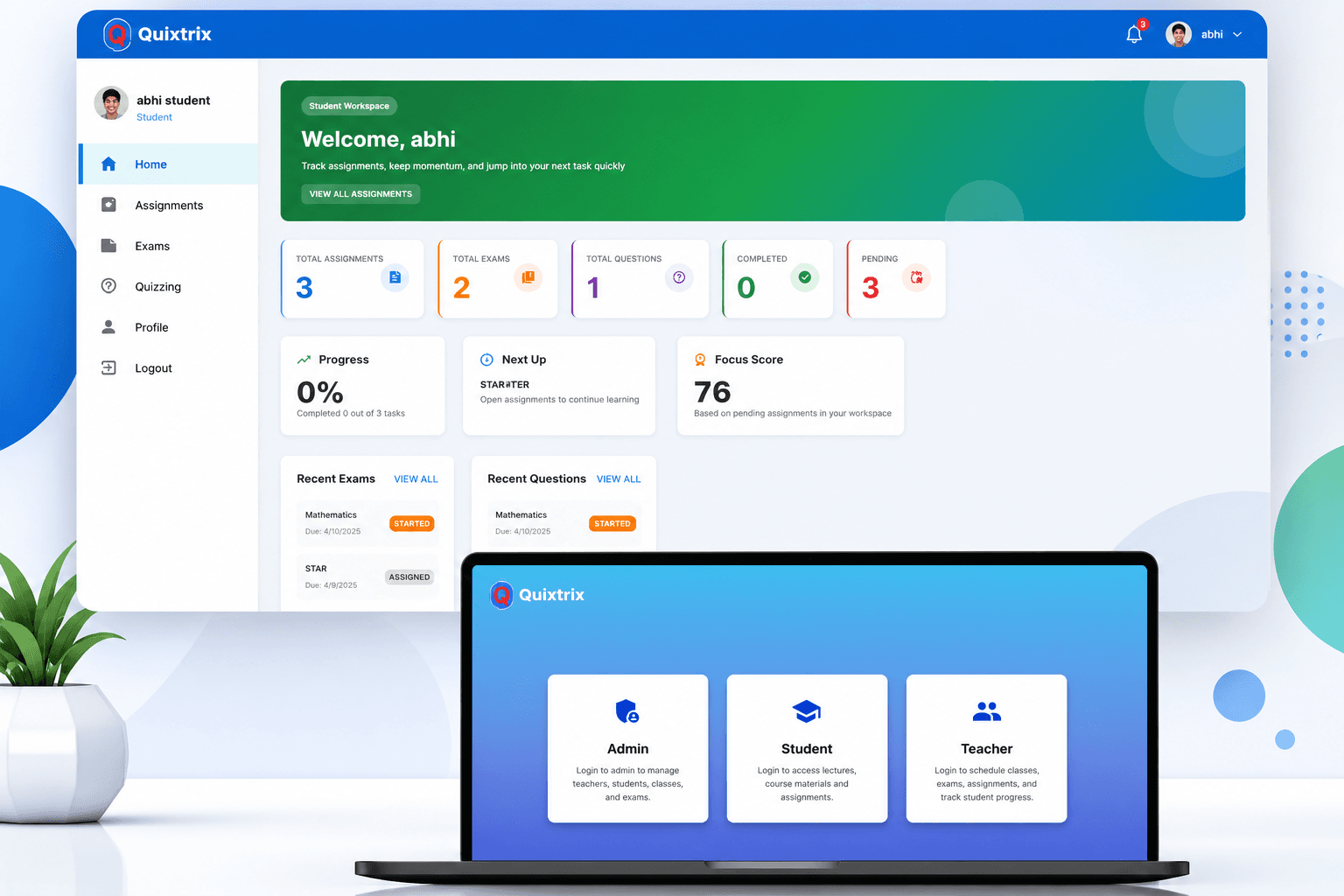
Running exams reliably online is harder than it looks: institutions need students to join and submit within a strict window, teachers need a fast way to build and grade question banks without a spreadsheet mess, and administrators need one place to see everything — who's enrolled, what's scheduled, and how the platform is performing. Most schools were stitching together generic tools that weren't built for timed, high-stakes assessment.
Core Pain Points Addressed:
- ❌ No dedicated timing control — generic tools don't enforce a hard exam window with automatic submission.
- ❌ Manual question bank management — building and reusing exam questions meant spreadsheets, not a system.
- ❌ Disconnected roles — students, teachers, and admins working off different tools with no shared source of truth.
- ❌ Limited visibility into performance — no built-in way to track student history or platform-wide exam analytics.
- ❌ No central control — operators had no single place to manage courses, permissions, and exam rules.
Quixtrix
EdTech & Online Examinations
Student Web App, Teacher Web App & Admin Panel
UI/UX, Web App Development, Exam Engine & Admin Systems
Three Apps, One Exam Platform
Quixtrix is an online examination platform built around three roles that rarely get equal attention: the student sitting the exam, the teacher who built it, and the admin who has to keep the whole system running. Most exam tools optimize for one of these and leave the other two as an afterthought.
Students get a focused, timed exam experience — join, attempt, and submit within a strict window, with an automatic timer that starts the moment the exam begins and counts down to submission. Teachers get the tools to build question banks, schedule tests, assign them to specific students or classes, and grade and analyze results without leaving the platform.
Sitting above both is an admin panel that treats the exam platform as an operation to be run, not just a feature to be shipped — managing users, courses, question banks, roles and permissions, and platform-wide reporting from a single console.
Three Apps, Purpose-Built for Their Role
Student Web App
Students securely register, log in, and join assigned exams from anywhere. Once an exam begins, an automatic timer starts and counts down until submission — with instant result viewing (if enabled), performance tracking, exam history, notifications, and profile management.
Teacher Web App
Teachers create question banks, design exams with time limits, and schedule tests for specific students or classes. Live exam progress, submission review, result publishing, and detailed performance analytics all run through the same app.
Admin Panel
The central management system for the platform: students, teachers, courses, subjects, exams, question banks, user roles and permissions, announcements, reports, and system settings — with visibility into platform activity and exam rules from one console.
The Life of an Exam
From question bank to published result — five steps that keep every role in sync.
Teacher builds the question bank
Questions are created and organized by course and subject, ready to be assembled into an exam.
Exam is designed and scheduled
A teacher sets the time limit, assigns the exam to specific students or classes, and schedules when it opens.
Student joins and the timer starts
Once the student begins, an automatic countdown starts — the exam auto-submits when time runs out.
Teacher monitors and grades
Live exam progress is visible as students work; submissions are reviewed and results are published once grading is complete.
Admin oversees the platform
Enrollment, roles, question banks, and reporting are managed centrally, with analytics on performance and platform activity.
Key Features at a Glance
Student Web App
- ✓ Secure registration & login
- ✓ Join assigned exams from anywhere
- ✓ Automatic timer with auto-submit
- ✓ Instant result viewing (if enabled)
- ✓ Performance tracking & exam history
- ✓ Notifications & profile management
Teacher Web App
- ✓ Question bank creation & management
- ✓ Timed exam design
- ✓ Scheduling & assignment to students/classes
- ✓ Live exam progress monitoring
- ✓ Submission review & result publishing
- ✓ Performance reports & analytics
Admin Panel
- ✓ Student & teacher management
- ✓ Course & subject management
- ✓ Question bank oversight
- ✓ Roles & permissions
- ✓ Announcements & reports
- ✓ System & exam rule configuration
Technology Stack
Three web apps and a real-time exam engine, built on a consolidated stack so one team could move across every surface.
React
Powers all three interfaces — the timed exam experience students sit through, the question-bank and grading tools teachers use, and the management console admins run the platform from.
Node.js
Handles authentication, exam scheduling, the timing and auto-submit logic that closes out an exam, and grading/reporting once submissions come in.
MongoDB
Stores users, courses, question banks, exams, and submissions under one flexible document model.
Let's Pressure-Test It
Book a free call and tell us what you're building. Worst case, you leave with honest feedback and a clearer plan. Best case, you leave with a team that ships.