
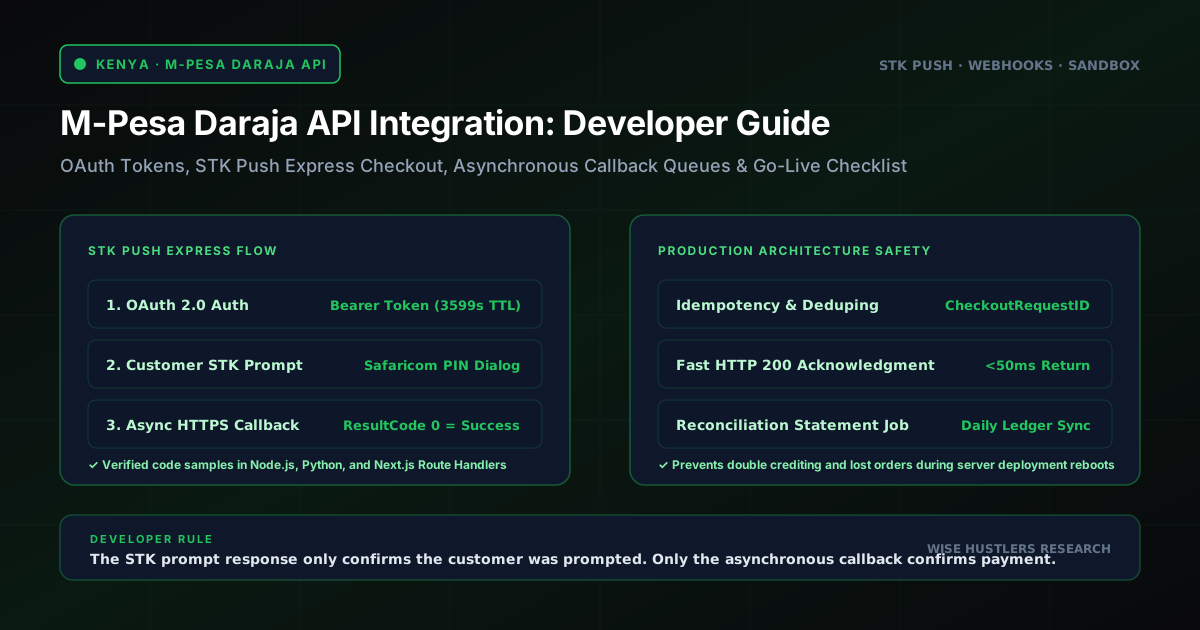
# M-Pesa Daraja API Integration: Complete Developer Guide
Integrating M-Pesa into a Kenyan website means calling Safaricom's Daraja API to trigger an STK Push — the PIN prompt that appears on a customer's phone — collect payment, and receive the result on a callback URL your server controls. There's no card form and no redirect to a third-party checkout page.
What This Solves
If you're building or upgrading an online store for the Kenyan market, M-Pesa is not optional — it's the payment method most of your customers will expect by default, ahead of card or any other option. This guide covers the actual mechanics: registering a Daraja developer account, generating an OAuth access token, sending an STK Push request from your own server, and handling the asynchronous callback Safaricom sends back with the result. It's written for a developer who can read Node.js and has never touched the Daraja API before, and it sticks to the specific "Lipa Na M-Pesa Online" (M-Pesa Express / STK Push) product — the flow used for customer-initiated web and app checkouts, not the B2C or bulk-payment APIs.
Prerequisites and Accounts Needed
Before writing any integration code, get these in place:
- A Safaricom Daraja developer account — free, sign up at developer.safaricom.co.ke.
- A sandbox app created in that account, using the "Lipa Na M-Pesa Sandbox" product. This gives you a sandbox Consumer Key and Consumer Secret — treat these like any other API secret, never commit them to source control.
- A server you control that can run Node.js and expose an HTTPS endpoint — Safaricom needs to reach your callback URL over the public internet, even in sandbox testing.
- A tunneling tool such as ngrok, for exposing your local development server publicly while you build (sandbox only — production requires a real, permanently reachable domain, not a tunnel).
- Basic familiarity with environment variables — every credential below belongs in
.env, not in your codebase. - If you eventually plan to go live, you'll also need a registered Kenyan business entity and an active M-Pesa Paybill or Till number issued through Safaricom Business — that process is separate from the developer account and is covered in the going-live section below.
You do not need a real Paybill/Till number to start. Safaricom publishes a shared sandbox shortcode and passkey that every developer uses for testing — no live money moves in sandbox.
Step-by-Step Integration
Step 1 — Register on the Daraja Portal and Create an App
Create your free account, then from the dashboard click Create App, name it, and attach the Lipa Na M-Pesa Sandbox product. Your app's dashboard page will show a Consumer Key and Consumer Secret immediately — copy both into your .env file:
MPESA_CONSUMER_KEY=your_sandbox_consumer_key
MPESA_CONSUMER_SECRET=your_sandbox_consumer_secret
MPESA_SHORTCODE=174379
MPESA_PASSKEY=bfb279f9aa9bdbcf158e97dd71a467cd2e0c893059b10f78e6b72ada1ed2c919
MPESA_CALLBACK_URL=https://your-ngrok-subdomain.ngrok-free.app/api/mpesa/callback
MPESA_ENV=sandbox
The shortcode and passkey above are Safaricom's own published sandbox values — the same ones used in Safaricom's own quickstart and in effectively every developer guide for this API. They are not secrets; your Consumer Key and Consumer Secret are the credentials that must stay private.
Step 2 — Generate an OAuth Access Token
Every Daraja call needs a Bearer token first. You request it with HTTP Basic Auth, using your Consumer Key as the username and Consumer Secret as the password:
// lib/mpesa/auth.js
const BASE_URL =
 process.env.MPESA_ENV === "production"
 ? "https://api.safaricom.co.ke"
 : "https://sandbox.safaricom.co.ke";

export async function getAccessToken() {
 const credentials = Buffer.from(
 `${process.env.MPESA_CONSUMER_KEY}:${process.env.MPESA_CONSUMER_SECRET}`
 ).toString("base64");

 const response = await fetch(
 `${BASE_URL}/oauth/v1/generate?grant_type=client_credentials`,
 {
 method: "GET",
 headers: { Authorization: `Basic ${credentials}` },
 }
 );

 if (!response.ok) {
 const body = await response.text();
 throw new Error(`Daraja OAuth request failed (${response.status}): ${body}`);
 }

 const data = await response.json();
 return data.access_token; // valid for roughly 3600 seconds
}
The response is a small JSON object with access_token and expires_in fields — the token lasts about an hour. Don't request a fresh token on every single payment call in a high-traffic app; cache it in memory (or Redis) until shortly before it expires, then refresh.
Step 3 — Initiate an STK Push Request
With a valid access token, you can call the STK Push endpoint. The request needs a Password field, which is a base64 string built from your shortcode, your passkey, and a timestamp — generated fresh for every request, since the timestamp is baked into it:
// lib/mpesa/stkPush.js
import { getAccessToken } from "./auth";

const BASE_URL =
 process.env.MPESA_ENV === "production"
 ? "https://api.safaricom.co.ke"
 : "https://sandbox.safaricom.co.ke";

function getTimestamp() {
 const now = new Date();
 const pad = (n) => String(n).padStart(2, "0");
 return (
 now.getFullYear().toString() +
 pad(now.getMonth() + 1) +
 pad(now.getDate()) +
 pad(now.getHours()) +
 pad(now.getMinutes()) +
 pad(now.getSeconds())
 );
}

export async function initiateStkPush({ phoneNumber, amount, accountReference, transactionDesc }) {
 const accessToken = await getAccessToken();
 const shortcode = process.env.MPESA_SHORTCODE;
 const passkey = process.env.MPESA_PASSKEY;
 const timestamp = getTimestamp();
 const password = Buffer.from(`${shortcode}${passkey}${timestamp}`).toString("base64");

 const payload = {
 BusinessShortCode: shortcode,
 Password: password,
 Timestamp: timestamp,
 // Use CustomerBuyGoodsOnline instead if your shortcode is a Till, not a Paybill.
 //
 TransactionType: "CustomerPayBillOnline",
 Amount: Math.round(amount),
 PartyA: phoneNumber, // format 2547XXXXXXXX
 PartyB: shortcode,
 PhoneNumber: phoneNumber,
 CallBackURL: process.env.MPESA_CALLBACK_URL,
 AccountReference: String(accountReference).slice(0, 12),
 TransactionDesc: String(transactionDesc).slice(0, 13),
 };

 const response = await fetch(`${BASE_URL}/mpesa/stkpush/v1/processrequest`, {
 method: "POST",
 headers: {
 Authorization: `Bearer ${accessToken}`,
 "Content-Type": "application/json",
 },
 body: JSON.stringify(payload),
 });

 const data = await response.json();

 if (!response.ok || data.ResponseCode !== "0") {
 throw new Error(
 `STK push request rejected: ${data.errorMessage || data.ResponseDescription || "unknown error"}`
 );
 }

 // { MerchantRequestID, CheckoutRequestID, ResponseCode, ResponseDescription, CustomerMessage }
 return data;
}
ResponseCode: "0" here only means Safaricom accepted the request and is now sending an STK prompt to the customer's phone. It does not mean payment succeeded — that confirmation only arrives later, on your callback URL. Store the CheckoutRequestID from this response against your order record immediately; it's the value you'll use to match the eventual callback (and, if you build it, to poll the separate Transaction Status API for orders that never get a callback).
Step 4 — Handle the Callback
This is the step most tutorials skim past and where most integration bugs live. Safaricom POSTs the real result — success or failure — to the CallBackURL you supplied, asynchronously, sometime after the initial response. In a Next.js app, that's a route handler:
// app/api/mpesa/callback/route.js
import { NextResponse } from "next/server";

export async function POST(request) {
 const payload = await request.json();

 // Acknowledge receipt immediately. Safaricom does not need you to finish
 // processing before you respond, and a slow response risks a retry.
 const ack = NextResponse.json({ ResultCode: 0, ResultDesc: "Accepted" });

 try {
 const callback = payload?.Body?.stkCallback;
 if (!callback) {
 console.error("Unexpected M-Pesa callback shape:", payload);
 return ack;
 }

 const { MerchantRequestID, CheckoutRequestID, ResultCode, ResultDesc } = callback;

 if (ResultCode === 0) {
 const items = callback.CallbackMetadata?.Item || [];
 const getValue = (name) => items.find((item) => item.Name === name)?.Value;

 await recordSuccessfulPayment({
 checkoutRequestId: CheckoutRequestID,
 merchantRequestId: MerchantRequestID,
 amount: getValue("Amount"),
 mpesaReceiptNumber: getValue("MpesaReceiptNumber"),
 transactionDate: getValue("TransactionDate"),
 phoneNumber: getValue("PhoneNumber"),
 });
 } else {
 // Common non-zero codes: 1032 = user cancelled, 1 = insufficient balance,
 // 2001 = wrong PIN or invalid initiator information.
 await recordFailedPayment({
 checkoutRequestId: CheckoutRequestID,
 merchantRequestId: MerchantRequestID,
 resultCode: ResultCode,
 resultDesc: ResultDesc,
 });
 }
 } catch (err) {
 // Log and swallow — you already sent your 200 response above, and
 // throwing here would not reach Safaricom anyway.
 console.error("Error processing M-Pesa callback:", err);
 }

 return ack;
}
recordSuccessfulPayment and recordFailedPayment are placeholders for your own database logic — look the order up by CheckoutRequestID, mark it paid or failed, and only then trigger anything customer-facing like an order confirmation. Two details matter more than they look:
- Respond fast, process after. Acknowledge the callback before doing slow work (database writes, emails, webhooks to other systems), and do that slow work in a way that can't block the response.
- Treat callbacks as retryable. Safaricom can redeliver a callback. Key your update on
CheckoutRequestIDand make the write idempotent — if you've already marked that ID paid, a repeat callback should be a safe no-op, not a duplicate order or a double-send confirmation email.
Testing in the Sandbox
Sandbox testing uses Safaricom's shared, non-secret test values — shortcode 174379, the published sandbox passkey, and test phone number 254708374149. No real M-Pesa prompt reaches a real device in sandbox; Safaricom's sandbox environment simulates the flow so you can build against realistic request/response shapes before you have a live Paybill or Till.
A practical test sequence:
1. Confirm OAuth works in isolation first. Call getAccessToken() alone and log the result. If this fails, nothing downstream will work, and the error is almost always a wrong Consumer Key/Secret pairing or a typo in the Basic Auth encoding.
2. Expose your callback endpoint publicly with ngrok (ngrok http 3000, then use the generated https://*.ngrok-free.app URL as MPESA_CALLBACK_URL) — Safaricom cannot reach localhost.
3. Send a test STK push using the sandbox shortcode and the test phone number, and confirm you get back a ResponseCode: "0" with a CheckoutRequestID.
Before wiring anything into your app, it's worth confirming the OAuth step works with a plain curl call, so you can rule out a code bug versus a credentials problem:
curl -X GET \
 "https://sandbox.safaricom.co.ke/oauth/v1/generate?grant_type=client_credentials" \
 -H "Authorization: Basic $(echo -n 'YOUR_CONSUMER_KEY:YOUR_CONSUMER_SECRET' | base64)"
A working response looks like {"access_token": "...", "expires_in": "3599"}. If this fails, the problem is your Consumer Key/Secret pairing or app configuration, not your Node.js code — fix it here before debugging anything downstream.
4. Watch your callback endpoint's logs. In sandbox, the callback should arrive within seconds. Log the full raw payload before you parse anything — you want that raw record for debugging and, later, for reconciliation.
5. Deliberately test a failure path, not just the happy path — the Daraja portal's simulate tooling lets you trigger scenarios like a cancelled prompt so you can confirm your ResultCode !== 0 branch actually runs.
6. Never test against a live Paybill/Till with real money until you've watched both success and failure callbacks land correctly in sandbox first.
Error Handling and Edge Cases
| Situation | What you'll see | How to handle it |
|---|---|---|
| Customer cancels the prompt or lets it time out | Callback with ResultCode: 1032 (or a timeout with no callback at all) | Mark the order as failed/abandoned; let the customer retry — don't treat silence as success |
| Insufficient M-Pesa balance | Callback with ResultCode: 1 | Show a clear message; this is a customer-side issue, not a bug in your integration |
| Wrong PIN entered too many times / invalid credentials | Callback with ResultCode: 2001 | Log for your own monitoring; if this spikes, check your production credentials, not just customer behaviour |
| Callback never arrives | No POST to your CallBackURL within a reasonable window | Build a fallback: poll the Transaction Status API using the stored CheckoutRequestID after a timeout, rather than leaving the order stuck as pending indefinitely |
| Duplicate callback delivery | Two identical POSTs for the same CheckoutRequestID | Idempotent writes (as in Step 4) so a retry can't create a duplicate order or double confirmation |
| OAuth token expires mid-session | 401/invalid token error on an API call | Catch it, request a fresh token, and retry the call once — don't let a stale cached token silently fail every request until you restart the server |
| Phone number in the wrong format | STK push rejected before it reaches the customer | Normalise every input to 2547XXXXXXXX (or 2541XXXXXXXX for newer ranges) before sending — don't assume customers will type it correctly |
Kenyan customers will type their number as 0712345678, +254712345678, or 254712345678 depending on habit and device. Normalise before it ever reaches the STK push payload:
// lib/mpesa/phone.js
export function normalizeKenyanPhone(input) {
 const digits = String(input).replace(/\D/g, "");

 if (digits.startsWith("254") && digits.length === 12) return digits;
 if (digits.startsWith("0") && digits.length === 10) return `254${digits.slice(1)}`;
 if ((digits.startsWith("7") || digits.startsWith("1")) && digits.length === 9) {
 return `254${digits}`;
 }

 throw new Error(`Unrecognised Kenyan phone number format: ${input}`);
}
Run every PartyA/PhoneNumber value through something like this before it reaches initiateStkPush — a malformed number is one of the most common causes of STK pushes that silently never reach a real device.
Because a successful callback carries a customer's phone number and transaction details, treat that stored data under Kenya's data protection rules the same way you would any other personal data you hold — worth reviewing alongside your site's broader compliance posture, not just as a payments question.
Going Live: Checklist
Moving from sandbox to a real Paybill or Till accepting real money is a separate process from creating a developer account, and it takes real paperwork:
- [ ] Registered Kenyan business entity with a Certificate of Registration/Incorporation
- [ ] KRA PIN certificate for the business
- [ ] National ID or passport of the authorized signatory
- [ ] An active M-Pesa business account (Paybill or Till) already set up through Safaricom Business — this is a separate application to Safaricom's business side, not the Daraja portal
- [ ] Production app created in your Daraja portal account, generating production Consumer Key/Secret
- [ ] Production Passkey (Safaricom emails this after go-live approval)
- [ ] Every
sandbox.safaricom.co.keURL in your code replaced withapi.safaricom.co.ke - [ ] Callback URL is public HTTPS with a valid, non-expired certificate from a trusted CA — no localhost, no ngrok tunnel, no self-signed cert
- [ ] Callback handler already tested to respond fast and process idempotently (see Step 4)
- [ ] Monitoring/alerting in place for callback failures and API errors, not just happy-path logging
- [ ] A reconciliation process that periodically compares your records against your actual M-Pesa statement — callbacks can be missed, and this is your safety net
. Everything above is infrastructure and paperwork, not code — most of the integration code itself doesn't change between sandbox and production beyond the base URL and credentials.
FAQ
Do I need a real Paybill or Till number to start building?
No. Safaricom's sandbox uses a shared, published test shortcode (174379) and test phone number, so you can build and test the entire flow — OAuth, STK push, callback handling — before you have a live business account.
Why did my STK push return success but the customer says nothing happened?
The initial response only confirms Safaricom accepted your request and is sending the prompt — it is not payment confirmation. Check whether your callback endpoint actually received and correctly parsed the follow-up POST; a silent failure in callback handling is the most common cause of this symptom.
Can I use the STK Push API for recurring or subscription billing?
No — this API is a one-time customer-initiated push per transaction. Recurring billing on M-Pesa needs a different approach (repeated individual pushes on a schedule, or a separate standing-order arrangement), which is out of scope for this guide.
What happens if my callback endpoint is down when Safaricom tries to deliver the result?
You risk an order sitting in "pending" with no resolution. This is exactly why a Transaction Status API polling fallback and a reconciliation process against your M-Pesa statement matter — don't rely on the callback as your only source of truth for whether payment happened.
Get This Built Properly
Getting the OAuth token, STK push, and callback handling right is a day or two of focused work for a developer who's done it before — and a recurring source of "why didn't this order get marked paid" tickets for one who hasn't. If you'd rather have this wired into your existing store or booked in as part of a new build, get in touch and we'll scope it against your actual checkout flow rather than a generic template. For the wider payments picture beyond M-Pesa, our e-commerce guide and ongoing support and maintenance options cover what happens after launch.
---
Technical Architecture & Consultation with Wise Hustlers
For businesses in Kenya scaling digital platforms, Wise Hustlers designs custom software and web portals, high-availability cloud architecture, and automated lead systems. [Speak with our lead engineers today to review your technical scope](https://wise-hustlers.com/contact).