
# System Management Basics: Keeping Your Servers Healthy
TL;DR: System management is the ongoing work of keeping servers running, updated, monitored, and recoverable after they're already live — not something you do once at launch and forget. It's five habits repeated on a loop: watch what's happening, get alerted when something's wrong, fix it, keep things patched and backed up, and periodically plan for what's coming next.
Launching a Server Is the Easy Part
Spinning up a server today takes minutes — a few clicks in a cloud console, or one command in a terminal, and you have a machine running your app. The hard part was never getting a server online. It's keeping it healthy for the next three years while traffic grows, dependencies age, and things quietly break in the background.
That ongoing work is called system management (or "systems administration," "ops," or just "keeping the lights on," depending on who you ask). Think of it like owning a car: buying the car is a single afternoon. Keeping it running safely for years afterward — oil changes, tire rotations, noticing a warning light before it becomes a breakdown — is the actual work.
The Five Habits of Healthy System Management
Good system management isn't a checklist you complete once — it's a loop you run continuously.
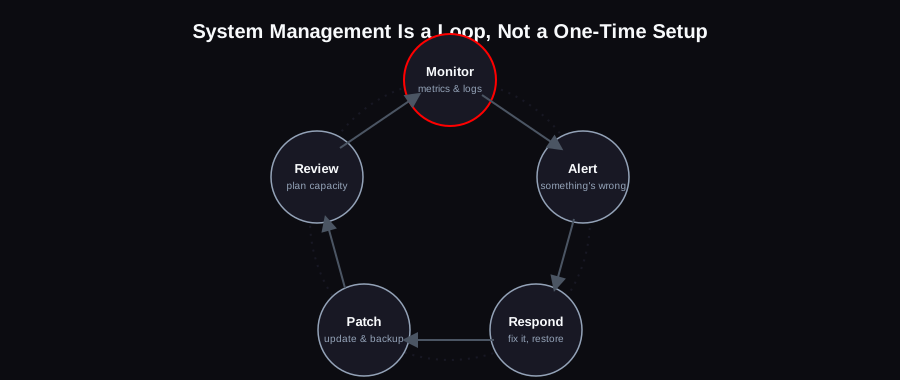
1. Monitoring: Know What's Happening Before Users Tell You
Monitoring means constantly collecting data about your systems — how much CPU and memory they're using, how fast requests are responding, whether error rates are climbing, whether disk space is running low. Without it, the first sign of a problem is usually an angry user, which is the worst possible way to find out.
Two tools show up constantly in real-world setups: Prometheus, which collects and stores these metrics, and Grafana, which turns them into readable dashboards. Teams that want a fully managed, all-in-one version of this often reach for Datadog instead, which bundles metrics, logs, and traces into one hosted platform rather than something you run and maintain yourself.
2. Alerting: Get Told, Don't Go Looking
Monitoring collects the data; alerting is what taps you on the shoulder when a number crosses a line that matters — CPU pinned at 95% for ten minutes, error rate above 5%, disk space under 10% free. A good alert is specific enough to act on immediately and rare enough that people don't start ignoring it.
The single most common mistake here is alerting on too much. If every minor blip pages someone at 3am, real problems get lost in the noise — a phenomenon ops teams commonly call "alert fatigue" — a well-documented failure mode where too many low-value alerts drown out the ones that matter.
3. Responding: Fix It, Then Understand It
When an alert fires, the immediate job is to restore service — restart the process, roll back the last deploy, fail over to a backup. Then, once things are stable again, the real work is figuring out why it happened, so the same alert doesn't fire again next week for the same reason.
This is also where backups earn their keep. A backup you've never tested restoring from isn't really a backup — it's a hope. Part of responsible system management is periodically proving that a restore actually works, before you're relying on it during a real incident.
4. Patching: Staying Updated on Purpose, Not by Accident
Software has security vulnerabilities discovered in it constantly — operating systems, libraries, the frameworks your app runs on. Patching means applying those fixes on a regular, deliberate schedule, rather than waiting until something breaks or gets exploited.
This is also where infrastructure as code tools like Ansible and Terraform matter. Instead of logging into ten servers one by one to make the same change, these tools let you describe your infrastructure as a file, apply it consistently everywhere, and know exactly what changed and when — which turns "did we patch all the servers?" from a guessing game into a fact you can check.
5. Reviewing: Plan for the Traffic You Don't Have Yet
Periodically — monthly or quarterly for most teams — it's worth stepping back and asking questions monitoring alone won't surface: Is a server consistently running near its limit, meaning it's time to scale (see our horizontal vs vertical scaling guide)? Is a growing amount of traffic hitting the database directly that a cache like Redis could absorb? Are costs creeping up in a way that needs attention before it becomes a budget problem?
This is the step teams skip most often, because nothing is actively on fire — which is exactly why skipping it eventually leads to something being on fire.
A Simple Way to Think About Priority
If you're setting this up for the first time and can't do everything at once, the order that matters most is:
1. Backups first. Before anything else, make sure you can recover if the worst happens. This is the one mistake that turns a bad day into a company-ending one.
2. Monitoring and alerting second. You can't fix what you don't know is broken.
3. Patching on a schedule third. Vulnerability exploitation overtook stolen credentials as the single most common way breaches start in 2026, per Verizon's Data Breach Investigations Report — and the same report found organizations had patched only 26% of known-exploited vulnerabilities by the end of 2025, with a median time-to-patch of 43 days (Verizon DBIR 2026). Most of that gap isn't unknown zero-days — it's fixes that already exist and simply haven't been applied yet.
4. Automation and reviews last. Valuable, but they compound over time rather than preventing an immediate disaster.
FAQ
Is system management the same as DevOps?
They overlap heavily but aren't identical. System management is specifically the operational work of keeping running systems healthy. DevOps is a broader philosophy about how development and operations teams work together — including things like deployment pipelines and infrastructure-as-code — that system management practices fit inside of.
Do I need a dedicated person for this, or can developers handle it?
At small scale, developers commonly handle system management themselves, often using managed cloud services (managed databases, managed monitoring) to reduce how much they need to do by hand. As systems and teams grow, it typically becomes specialized work, because doing it well takes real, ongoing attention.
What's the single biggest system management mistake teams make?
Treating backups as done once they're configured, without ever testing a restore. Backups can fail silently — a misconfigured job, a corrupted file, a permissions error — and the only way to know yours actually works is to occasionally, deliberately restore from it.
How is this related to scaling?
Scaling (covered in our vertical vs horizontal scaling guide) is really one output of good system management — the "review" step is what tells you when you actually need to scale, instead of guessing or reacting after something has already fallen over.
Setting up monitoring, backups, and patching properly from day one — rather than retrofitting it after an incident — is part of the infrastructure work we do as part of our cloud & DevOps services.