
# What Is Redis? A Simple Guide to In-Memory Caching
TL;DR: Redis is a database that keeps all of its data in your server's memory (RAM) instead of on disk, which makes it extremely fast — Redis's own published benchmarks show sub-millisecond latency even at over a million transactions per second (Redis). Most teams don't use it to replace their main database; they use it alongside one, as a cache that stores the answers to expensive, frequently-repeated questions so the real database doesn't have to keep answering them.
Start With the Sticky Note
Imagine your desk has two places to keep information: a filing cabinet across the room, and a stack of sticky notes right in front of you.
The filing cabinet holds everything — every record, permanently, safely. But every time you need something from it, you have to get up, walk over, search through folders, and walk back. That's your main database: reliable, complete, but relatively slow to query, especially under heavy load.
The sticky notes hold only what you're using right now. They're right in front of you, so grabbing one is instant — no walking, no searching. But there's a catch: your desk isn't infinite, so old notes eventually get thrown away to make room for new ones, and if the office burns down, the sticky notes are gone while the filing cabinet (if it's fireproof) survives.
Redis is the sticky notes. Your main database — Postgres, MySQL, MongoDB, whatever it is — is the filing cabinet.
What "In-Memory" Actually Means, and Why It's Fast
Every database has to store its data somewhere. Traditional databases store it on disk (even fast SSDs), which means every query involves reading from physical storage. Redis stores its data in RAM instead — the same memory your computer uses to run whatever program is currently open.
RAM is dramatically faster to read from than disk — often by two or more orders of magnitude, depending on the workload. That's the entire reason Redis exists: by giving up permanent, unlimited storage, it gets to be extremely fast. It's become the default choice for in-memory data storage for exactly this reason — when speed is the whole point, most teams reach for Redis first.
What People Actually Use Redis For
Redis isn't a single-purpose tool — it's more like a fast, flexible toolbox. The four most common jobs it does:
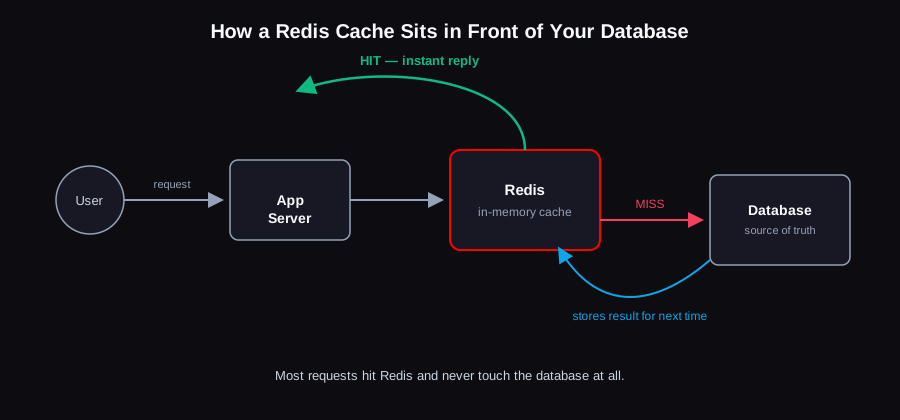
1. Caching (the big one). If your app runs the same expensive database query or calculation over and over — a product page's price and stock, a user's profile, a homepage's "trending posts" list — you can compute it once, store the result in Redis, and serve it from there for every request afterward, until it changes. This is the single most common reason Redis shows up in a system.
2. Session storage. When you log into a website, something needs to remember "this browser is logged in as this user" between page loads. Redis is a natural fit — sessions need to be read constantly, they're temporary by nature, and losing one just means a user has to log in again (not a catastrophe, unlike losing a database record).
3. Rate limiting. APIs that need to say "you've made too many requests this minute, slow down" need somewhere fast to count requests per user, per second — a job Redis is built for, since it can safely handle rapid counters being incremented from many places at once.
4. Real-time features. Leaderboards, live counters, pub/sub messaging between services, queues — anything that needs to update constantly and be read instantly tends to end up in Redis rather than a traditional database.
"But Doesn't Redis Lose Everything If It Restarts?"
This is the question every beginner asks, and it's a fair one — RAM is famously wiped when a machine powers off.
Redis actually gives you a choice, because not every use case needs the same durability:
- No persistence at all. If Redis is purely a cache — every value it holds also exists in the real database — losing it on restart is fine. The app just rebuilds the cache as requests come back in, a little slower for the first few minutes.
- RDB snapshots. Redis periodically saves a full snapshot of its dataset to disk. Fast to restore from, but you can lose a few minutes of the most recent writes if it crashes between snapshots.
- AOF (Append-Only File). Redis logs every write command to disk as it happens, so it can replay them to rebuild the exact dataset after a restart. Much safer, at the cost of slightly more disk activity.
- Both together. Most production setups that care about durability run a combination — RDB for fast restarts, AOF for minimal data loss.
The honest answer for most teams: if you're using Redis purely as a cache in front of a real database, don't overthink persistence — turn it off or leave it minimal, and let the cache rebuild itself naturally.
What Happens When Redis Runs Out of Room?
Because RAM is finite (and, gigabyte for gigabyte, more expensive than disk), Redis can't just keep everything forever. You set a memory limit, and once it's reached, Redis needs a rule for what to throw away to make room for new data.
The most common rule, by far, is LRU — Least Recently Used — which evicts whatever hasn't been accessed in the longest time, on the theory that data nobody's asked for recently probably isn't needed right now either. It's the same logic as clearing the oldest, least-touched sticky notes off your desk first.
Redis vs. a Regular Database: When to Use Which
| Redis | Traditional database (Postgres, MySQL, MongoDB) | |
|---|---|---|
| Where data lives | RAM (memory) | Disk (persistent storage) |
| Speed | Sub-millisecond | Milliseconds to seconds, depending on the query |
| Storage limit | Limited by available RAM (expensive to scale up) | Limited by disk (cheap to scale up) |
| Durability | Optional, and even then, a secondary concern | The whole point — this is your source of truth |
| Typical role | Cache, session store, rate limiter, real-time layer | System of record for everything that must never be lost |
The two aren't competitors — in almost every real system, they work together: the database holds the truth, Redis holds a fast copy of whatever's being asked for most right now.
FAQ
Do I need Redis for a small app?
Probably not yet. Redis solves a problem you get after your database starts struggling under repeated, predictable queries, or after you need shared state across multiple servers (see our horizontal vs vertical scaling guide for why that matters). Adding it before you have that problem is extra infrastructure to maintain for no benefit yet.
Is Redis a replacement for my main database?
Almost never, for most applications. It's missing things a primary database is built for — rich querying, joins, strong durability guarantees by default. Redis is nearly always a companion to a real database, not a replacement for one.
What's the difference between Redis and Memcached?
Both are in-memory caches, and for pure "store a value, fetch it fast" caching, they're similar. Redis's advantage is that it supports much richer data structures (lists, sets, sorted sets, hashes — not just simple key-value pairs) and extra features like pub/sub messaging and optional persistence, which is why it's become the more common default choice.
Can Redis lose data if the server crashes?
Yes, unless you've enabled AOF persistence, in which case you'd lose at most a few seconds of the most recent writes. If Redis is being used purely as a cache backed by a real database, this usually doesn't matter — the "real" data was never at risk.
Choosing where a caching layer like Redis fits into your architecture — and getting the cache-invalidation logic right, which is where most caching bugs actually live — is part of what we help teams design as part of our cloud & DevOps services.